What Is a Subscription Tracker? A Practical Guide for 2026
A subscription tracker helps you see every recurring charge in one place. Learn how they work, what types exist, and how to pick one that actually protects your privacy.
A subscription tracker is a tool that lists every service you pay for regularly - streaming, software, fitness apps, cloud storage, news - with the amount, billing cycle, and renewal date. The point is simple: stop paying for things you forgot you signed up for.
Most people do not know how many subscriptions they have. Not because they are careless, but because the subscriptions are scattered across app stores, PayPal, credit cards, and direct debits. A subscription tracker collects them into one place so you can see the total, spot what you no longer use, and cancel before the next charge.
What a Subscription Tracker Actually Does
At minimum, a subscription tracker stores a list of services with their cost and renewal date. At best, it discovers them for you, keeps the list current, and alerts you before a payment goes through. The core jobs are:
Organisation: showing costs, cycles, and renewal dates in one view
Reminders: notifying you before a charge or price increase
Cancellation support: making it easier to leave services you no longer want
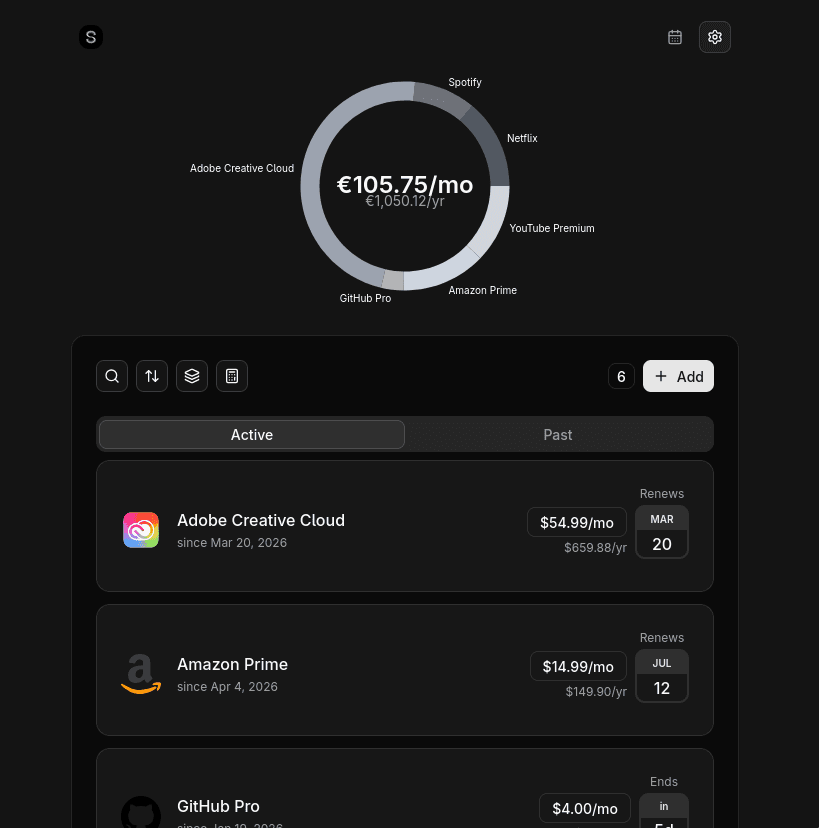
What the organisation job looks like in practice - one total, one list, and the next renewal date on every row.
The difference between a useful tracker and a forgotten spreadsheet is automation. If you have to update it by hand every time a trial converts or a price changes, it will drift out of date and stop saving you money.
The Three Types of Subscription Tracker
The three kinds of subscription tracker
Type
How it finds your subscriptions
The trade-off
Manual
You type each one in
Total privacy, but anything you forgot stays invisible
Bank-linked
Reads your transaction history
Automatic, but it sees every purchase you make
Email-based
Reads billing receipts in your inbox
Automatic without bank access, but misses anything that never emailed you
1. Manual trackers
You enter every subscription yourself. Apps like Bobby and Subby fall here, as does any spreadsheet. The upside is total privacy and control. The downside is that forgotten subscriptions stay forgotten - the very problem you are trying to solve.
2. Bank-linked trackers
Apps like Rocket Money, PocketGuard, and Truebill connect to your bank through Plaid and detect recurring charges from your transaction history. They are powerful, but they need read access to your full financial life to find a handful of subscriptions. They also tend to charge a monthly fee.
3. Email-based trackers
These tools scan your inbox for receipts, renewal notices, and billing confirmations. Because every subscription sends email, the result is usually the same as a bank-linked app - but the app only sees subscription-related messages, not your entire transaction history. Suprascribe is in this category.
What to Look For in a Subscription Tracker
Automatic discovery on the free or affordable tier
No requirement to link your bank account
Unlimited subscriptions, or a generous free cap
Renewal reminders before charges hit
Multi-currency support if you pay in more than one currency
A cancellation path that does not require hunting through support pages
Be suspicious of any subscription manager that charges a monthly subscription. Paying a recurring fee to manage your recurring fees is the problem dressed up as the solution.
Honest Comparison: The Main Options
Here is how the biggest names compare on the questions that actually matter:
Rocket Money: strong auto-discovery and bill negotiation, but requires full bank access via Plaid and charges a monthly premium
PocketGuard: full budgeting plus subscription detection, also bank-linked, $12.99/mo or $74.99/yr or $149.99 lifetime, and no free plan since 2026
Bobby: polished manual tracker, $2.99 one-time unlock, but Apple-only and capped on the free tier
YNAB: excellent budgeting methodology, significant overkill if you only want subscriptions, ~$109/year
Suprascribe: email-based auto-discovery, unlimited free tier, no bank access, one-time PRO upgrade
If you want budgeting alongside tracking, Rocket Money or PocketGuard are the strongest bank-linked choices. If you want automatic discovery without handing over your bank login, an email-based tracker is the better fit.
What the Main Options Do Well
Rocket Money and PocketGuard earn their popularity by removing as much friction as possible. Rocket Money includes subscription detection on the free tier and adds bill negotiation and a cancellation concierge that handles the providers most people dread calling. PocketGuard wraps subscription detection in a full budgeting experience across iOS, Android and web, with spending insights and a lifetime purchase option for users who want to avoid another monthly charge.
On the manual side, Bobby remains one of the nicest Apple-only trackers, with polished design, Apple Watch support and a cheap one-time unlock. Subby offers a genuinely unlimited free tier that is hard to argue with. YNAB, meanwhile, is overkill for subscriptions alone but is genuinely excellent at what it was built for: teaching a budgeting methodology and giving committed users detailed control over every dollar.
How to Choose
Start by deciding whether you are comfortable linking your bank. If not, you have already eliminated most of the market leaders. Then decide whether you want to enter subscriptions manually or have them found for you. Most people who are serious about cutting waste choose automatic discovery - the forgotten subscriptions are where the money is.
A subscription tracker should make the total visible, turn renewals into conscious decisions, and get out of the way. The tool itself should not become another subscription.
Why Suprascribe Fits
Suprascribe scans Gmail, Outlook, iCloud, or any IMAP inbox to find subscriptions automatically. It does not store email content, it never touches your bank, and the free tier lets you track unlimited subscriptions manually. The PRO upgrade - auto-discovery, renewal reminders, calendar view, quick unsubscribe - is a one-time payment, not a recurring fee.
Every "best subscription tracker" list is written by one of the apps on it. Here is the honest version: what each tool is genuinely good at, what it costs, and the trade-off nobody mentions - whether it demands access to your bank account.
Not all free subscription managers are equal. Some cap features, some require bank access, some charge a monthly fee to manage your monthly fees. Here is how to pick the right one.
The fastest way to find every subscription you are paying for is to let a scanner read the receipts already sitting in your inbox. Here is how automatic discovery works, and how it compares to doing it by hand. No bank connection is involved - every subscription you have ever started sent you a receipt, so the record you need is already in your email.