The fastest way to find every subscription you are paying for is to let a scanner read the receipts already sitting in your inbox. Here is how automatic discovery works, and how it compares to doing it by hand. No bank connection is involved - every subscription you have ever started sent you a receipt, so the record you need is already in your email.
Almost nobody can name every subscription they pay for. The ones you remember are the ones you use - the streaming service you opened last night, the music app on your phone. The ones that cost you money are the ones you do not: a trial that converted eleven months ago, an annual plan that renews on a date you have never once thought about, a storage upgrade billed under a company name you would not recognise on a statement.
There are four ways to close that gap. One of them is automatic and takes minutes. The other three are manual and take between twenty minutes and a couple of hours, with different blind spots each. This guide covers all four, starting with the automatic one, and is honest about where each falls short.
The four methods, compared
Method
Time
What it catches
Cost
Needs bank access
Automatic email scanning
2-5 min
Anything that ever emailed you a receipt, including converted trials and annual plans
Free tools exist
No
Manual email search
30-90 min
The same emails, if you guess every keyword and check every folder
Free
No
Bank statement review
30-60 min
Charges hitting that one card - misses app-store and PayPal billing
Free
Yes
App store and PayPal audit
10-15 min
Only subscriptions billed through those platforms
Free
No
The two email-based methods are the only ones that see everything, because email is the one channel every subscription uses regardless of how it bills you. The difference between them is purely how long you spend. Everything below explains the automatic route first, then the three manual ones as fallbacks or as a way to double-check.
Method 1: Automatic email scanning (the fastest route)
Automatic discovery means connecting your inbox to a tool that reads the billing emails for you and extracts the service name, amount, and renewal date into a list. Suprascribe does this for Gmail, Outlook, and iCloud, and for any other provider over IMAP. Here is the whole process:
Create a free account - no credit card, no bank details.
Connect your inbox. Gmail and Outlook use OAuth, so you click through your provider's own consent screen and never hand over a password. iCloud and other providers use IMAP with an app-specific password you generate and can revoke.
Start the scan. It runs against your billing and receipt history rather than your whole mailbox, and finishes in a few minutes.
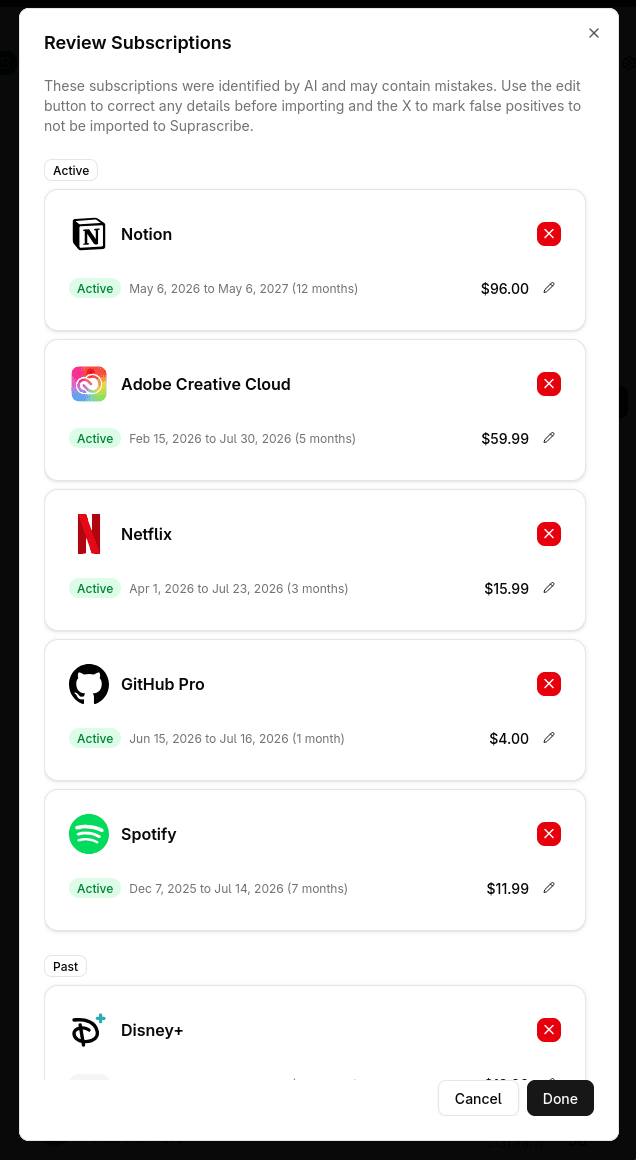
Review the results. You get a list of detected services with amounts and billing cycles - confirm the ones that are right, delete anything misread, and add anything you know about that never sent an email.
Cancel what you do not want, and set renewal reminders on what you keep.
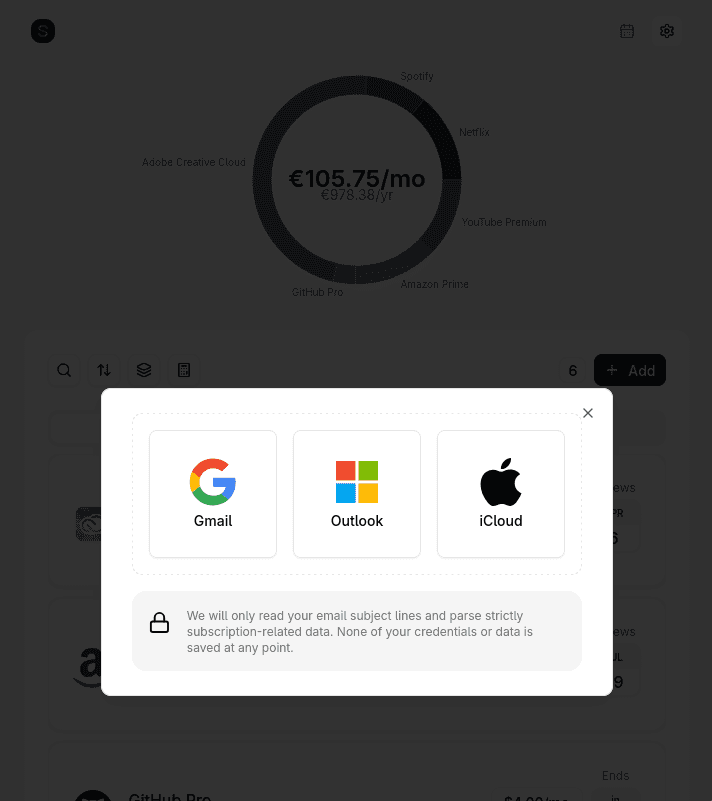
Step 2: pick the inbox to scan. Gmail and Outlook go through OAuth; iCloud and anything else connect over IMAP with an app-specific password.
The part people find surprising is step 4. A scan typically surfaces two or three services the person had genuinely forgotten - not services they were unsure about, services they had no memory of at all. Those are the ones that have been quietly billing for the longest.
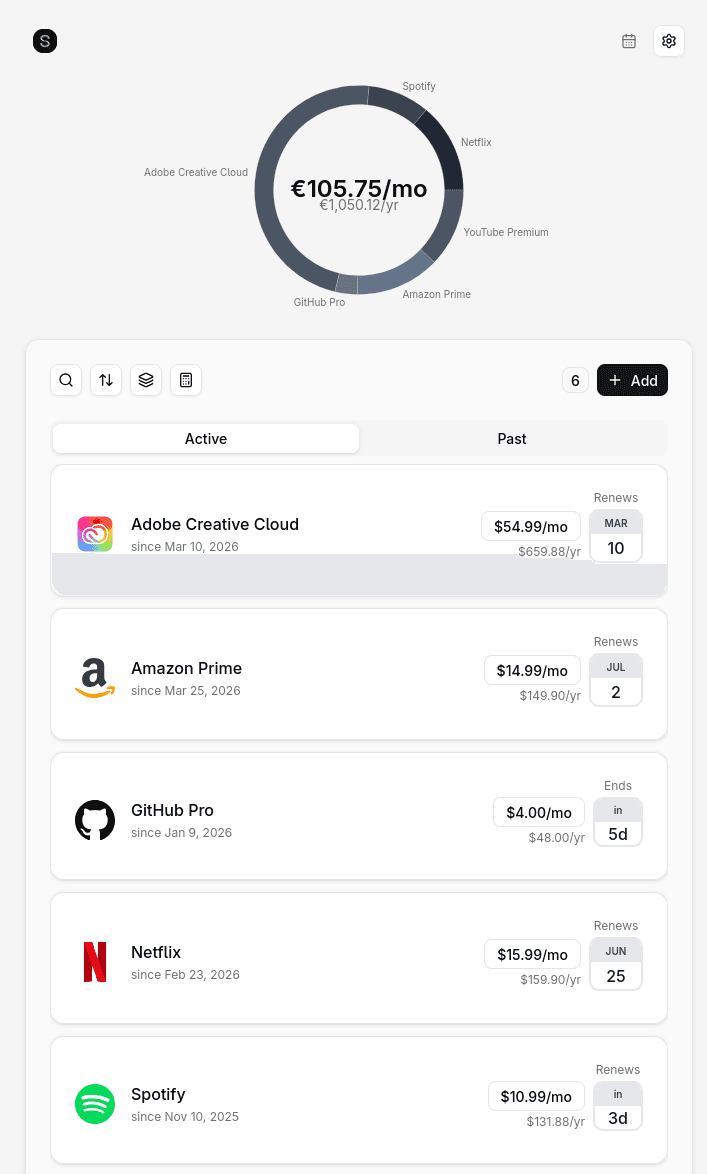
Step 4: the review screen. Everything the scan found is listed with its dates and price, so you can correct a misread amount or reject a false positive before any of it is imported.The result of a scan: every subscription found in the inbox, with its cost, billing cycle, and next renewal date.
How automatic subscription discovery actually works
It is worth understanding the mechanism, because "connect your email" sounds more invasive than what actually happens. The scan runs in four stages:
Scoped access. OAuth grants read-only access to mail. No send permission, no access to contacts, calendar, or files, and you can revoke it from your Google or Microsoft account settings at any time without involving the tool.
Pattern matching. The scanner queries for messages that look like billing - senders like billing@ and noreply@, subjects containing receipt, invoice, renewal, payment confirmation, and your subscription. Messages that do not match are never opened.
Extraction. For messages that do match, the subject, sender, and body are read once so the service name, amount, currency, and billing cycle can be pulled out.
Discard. The extracted fields are saved to your account. The email content itself is not stored - the scan is ephemeral, and once it finishes there is no copy of your mail anywhere.
That last point is the one to check before you trust any tool with an inbox. "We scan your email" and "we store your email" are very different products. Suprascribe is open source, so the scanning code is public and you can read exactly what it does rather than taking a privacy policy at its word.
What automatic scanning catches that a bank statement misses
Bank statements feel like the authoritative source, but they have a structural blind spot: a large share of consumer subscriptions are billed by an intermediary, so the line item on your statement says "APPLE.COM/BILL" or "PAYPAL" and tells you nothing about which service it was. Email has no such problem, because the service itself sends the receipt. Specifically, scanning finds:
Free trials that converted to paid - the conversion notice is an email, and often the only warning you ever got
Annual plans, which appear on a statement once every twelve months and are trivially missed in a three-month review
App Store and Google Play billing, where the merchant name is Apple or Google rather than the actual service
Anything charged to a card you no longer check, or to a second account
Services billed under an unfamiliar parent-company or payment-processor name
Subscriptions that changed price - the increase notice is in your inbox even if the old amount is what you remember
The reverse blind spot exists too, and it is worth being straight about: a subscription that has never emailed you - a legacy plan, or something set up as a direct debit years ago - will not show up in an email scan. That is what the statement review below is for.
Why email scanning beats bank linking
Most automatic subscription finders - Rocket Money, PocketGuard, and similar - work by connecting your bank account through Plaid. To find a €9.99 charge, they take a copy of your entire transaction history: your salary, your rent, your medical payments, every purchase you have made.
Scanning receipts reaches the same answer from a much narrower slice of data. The scanner sees billing emails and nothing else, and the sensitive material - your actual financial accounts - is never touched. If a tool that scans email is breached, the exposure is a list of service names and prices. If a tool holding a Plaid connection is breached, the exposure is your complete financial life.
Bank linking finds charges automatically but reads your entire transaction history and only sees the accounts you connect. Email scanning finds the same charges from billing receipts alone, across any card, but misses anything that never sent you an email.
Bank linking
Finds charges automatically
Reads your entire transaction history
Only sees the accounts you connect
Shows "APPLE.COM/BILL", not the service name
Email scanning
Finds charges automatically
Reads billing receipts and nothing else
Catches charges on any card or account
Misses anything that never emailed you
There is a practical benefit as well as a privacy one. Bank linking only sees the accounts you connect, so subscriptions on a partner's card, a work card, or an old account are invisible. An inbox tends to collect receipts across all of them.
Method 2: Manual email search
This is the same data source as automatic scanning, worked by hand. It costs nothing and works with any provider, and it is the right choice if you would prefer not to connect an inbox to anything.
Search your mail for each of these separately: "receipt", "invoice", "your subscription", "renewal", "billing", "payment confirmation", "thank you for subscribing", and "your trial ends".
Repeat each search in Spam and Promotions. Gmail in particular files a lot of billing mail under Promotions, and it is the folder people never look in.
Search for "subscription" restricted to senders containing "noreply" and "billing" - this catches receipts whose wording you did not guess.
Widen the date range to at least eighteen months so annual renewals fall inside it.
Write each service into a list as you find it, with the amount and the billing date. Do not trust yourself to remember one you saw two searches ago.
Budget thirty to ninety minutes depending on how old the mailbox is. The weakness is coverage rather than effort: you find the receipts whose phrasing you thought to search for, and a service that words its emails unusually stays hidden no matter how long you spend.
Method 3: Bank and card statement review
Use this to catch anything that does not email you, and to confirm that what you found is actually still being charged.
Download six to twelve months of statements for every card and account, not three - a three-month window cannot see an annual renewal.
Sort by merchant name rather than date. Recurring charges group together and become obvious; sorted by date they are scattered among ordinary spending.
Look for amounts that repeat exactly, month after month. Subscription pricing clusters at round numbers - 4.99, 9.99, 14.99, 19.99.
Search any merchant name you do not recognise. Billing entities frequently differ from the brand name you signed up with.
Check your PayPal and any stored-card accounts separately, since those charges appear on your statement as a single opaque merchant.
Method 4: App store and PayPal audits
A meaningful share of subscriptions never appear under their own name anywhere except inside the platform that bills them. These take ten minutes total and are worth doing even if you used one of the methods above:
Apple: Settings → your name → Subscriptions (or App Store → your profile → Subscriptions)
Google Play: Play Store → profile icon → Payments & subscriptions → Subscriptions
Your browser's saved payment methods, which sometimes reveal a signup you have no other record of
Note that these screens only show subscriptions still active on that account. Something you were billed for last month and that has since lapsed will not appear, which is why they complement rather than replace an email or statement review.
Keeping the list current without redoing this
Finding your subscriptions once solves this month. It does not solve next year, because the list grows again the moment you start a trial and forget it - which is exactly how the current list got built. Whatever method you used, the output needs to live somewhere that stays up to date rather than in a note you never open.
A tracker handles this in two ways: it holds the list with costs, billing cycles, and renewal dates so you can see the monthly total at a glance, and it re-scans your inbox periodically so anything new gets added without you doing another audit. Renewal reminders then arrive before a charge rather than after it, which is the difference between deciding to keep a subscription and simply being billed for one.
Every guide in this cluster
This is the hub for the topic. Each guide below covers one service or platform in detail.
The subscriptions draining the most money are the ones you never see, because they hide behind cryptic statement labels and app-store billing. This is a straightforward audit that surfaces all of them in about half an hour.
Your phone already has a subscription list buried in Settings or the Play Store, but it only shows a fraction of what you pay for. Here is how to track every subscription on iPhone and Android, not just the ones Apple or Google bill.
A subscription tracker is a tool that lists every service you pay for regularly - streaming, software, fitness apps, cloud storage, news - with the amount, billing cycle, and renewal date. The point is simple: stop paying for things you forgot you signed up for.