
1 May 2026·7 min read
The best free subscription manager in 2026
Not all free subscription managers are equal. Some cap features, some require bank access, some charge a monthly fee to manage your monthly fees. Here is how to pick the right one.
Most free subscription trackers are not really free. They cap your list, show ads, or demand a bank login before they will find anything. Here are the honest picks for 2026.
The phrase "free subscription tracker" is used loosely. Some apps are free for five subscriptions. Some are free if you manually type everything. Some are free only after you hand over your bank login so they can upsell you later. This guide focuses on trackers that are genuinely free and genuinely private - no bank access required.
A bank-linked tracker needs your full transaction history through Plaid or Finicity. A tracker that scans your inbox reads billing receipts only and never touches a financial account.
Needs your bank
Reads your inbox
Bank-linked apps like Rocket Money and PocketGuard need access to your full transaction history through Plaid or Finicity. They see every coffee, every grocery shop, every transfer - just to find a few recurring charges. That is a lot of exposure for a narrow job.
A tracker that works without bank linking relies on your inbox instead. Every subscription sends receipts and renewal notices, so an inbox scan finds the same charges with far less access. The only data involved is the list of services you pay for.
| Tool | Free tier | Discovery | Platform | Paid upgrade |
|---|---|---|---|---|
| Suprascribe | Unlimited, no credit card | Email-based, no bank login | Any browser, works as a PWA | One-time, not monthly |
| Bobby | Capped until you pay | Manual only | Apple devices only | $2.99 one-time |
| Subby | Unlimited, ad-supported | Manual only | Mobile only | Small one-time purchase removes ads |
| A spreadsheet | Unlimited | Manual only | Anywhere you can open a sheet | None |
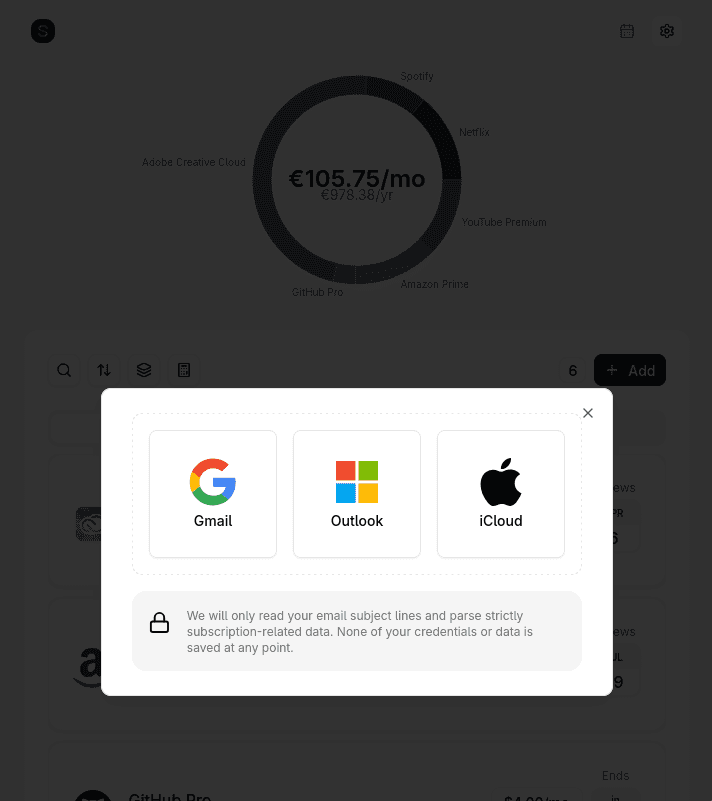
Suprascribe is web-based, open source, and free for unlimited manual tracking. Connect Gmail or Outlook via OAuth, or iCloud and any other provider over IMAP, and it scans your inbox for subscription-related emails automatically. No bank access, no stored email content, no subscription cap. PRO adds renewal reminders and a calendar view for a one-time payment.
Bobby is a polished, Apple-only tracker with a clean interface and a small one-time unlock ($2.99 for the All-in-one Pack). It is fully manual, so you enter every subscription yourself, and the free tier is capped until you buy the unlock. Great for iPhone users who want something simple and private.
Bobby has been a benchmark for Apple-only subscription tracking for good reason. The design is polished and consistent across iPhone, iPad, Mac and Vision, and the Apple Watch support means renewal information is glanceable in a way most trackers cannot match. The spend overview charts are clear without being overwhelming, and the one-time unlock pricing is refreshingly honest.
If your devices are all Apple and you prefer entering subscriptions yourself, Bobby delivers one of the nicest manual-tracking experiences available. It proves that a simple tool done beautifully can compete with much larger finance apps.
Subby is mobile-only and ad-supported, but the free tier is genuinely unlimited and the interface is straightforward. If you do not mind ads and want a simple manual tracker, it is a solid choice.
Subby is one of the most honest free trackers available. The interface is simple and uncluttered, the unlimited free tier is genuinely unlimited rather than a teaser, and the small one-time purchase to remove ads is priced fairly. It is a great fit for anyone who wants full manual control over their subscription list without signing up for yet another recurring service.
For a lightweight, no-surprises mobile tracker, Subby does exactly what it promises. It is particularly appealing to Android users who want a clean app that stays free as long as they are willing to tolerate a few ads.
A Google Sheets or Excel tracker costs nothing and links to nothing. The trade-off is upkeep: every new signup, price change, and cancellation is a manual edit, and a spreadsheet cannot ping you before a renewal. It is the most private option and the least likely to stay current.
A spreadsheet is the most private and flexible way to track subscriptions. Nothing is linked, nothing is shared, and you control every column and formula. For users who enjoy building their own systems or who simply do not want another account, a sheet is a completely valid solution.
It also teaches you something about your spending as you build it. Choosing the columns, normalising costs to annual figures, and adding conditional formatting for upcoming renewals turns the process into a small financial audit. The discipline of maintaining it is also what makes some people more aware of their subscriptions, not less.
A genuinely free subscription tracker should not do any of the following:
If you want automatic discovery without bank access, Suprascribe is the pick. If you live entirely on an iPhone and do not mind typing, Bobby is the nicer experience. If you want unlimited free tracking and do not mind ads, Subby works. If you want maximum privacy and are disciplined about upkeep, a spreadsheet is fine.
The one to avoid is any tracker that makes you link your bank before it will help. You do not need to expose your entire transaction history to find a few subscriptions.
Not all free subscription managers are equal. Some cap features, some require bank access, some charge a monthly fee to manage your monthly fees. Here is how to pick the right one.
Every "best subscription tracker" list is written by one of the apps on it. Here is the honest version: what each tool is genuinely good at, what it costs, and the trade-off nobody mentions - whether it demands access to your bank account.
A spreadsheet is the most private way to track subscriptions - nothing is linked, nothing is shared. Here is a template you can rebuild in two minutes, the columns that actually matter, and an honest look at where a spreadsheet stops being enough.
Still have questions? View all FAQs or contact us.